

You can sign up as a merchant on the TikTok Shop US Seller Center to start selling products. Approval usually takes about 24 to 48 hours once you submit a complete application.
To register as a US seller, you must be 18 or older, live in the US, and use a phone number and email that no other TikTok Shop uses. You verify your identity with a US ID, Social Security Number (SSN) or ITIN (Individual Taxpayer Identification Number), and proof of address.
Businesses also add an Employer Identification Number (EIN) and owner details. TikTok reviews your application and emails you if it fails. This guide is for anyone who wants to become a TikTok seller in the US, whether you sell under your own name or through a company. Our TikTok Shop agency files for brands as a TikTok Shop Partner.
- TikTok Shop Seller Requirements
- Individual vs Business Registration
- Documents And Information You Need
- How To Register For TikTok Shop
- Common Sign-Up Errors
- How Long TikTok Shop Approval Takes
- Why TikTok Shop Applications Get Rejected
- After Your Shop Is Approved
TikTok Shop Seller Requirements
These rules come from TikTok’s US registration guides for individuals, sole proprietors, and corporations and partnerships.
Who Can Register
You can register for a US TikTok Shop if you:
- Are 18 or older: For businesses, every owner and representative must be 18 or older.
- Live in the US: Businesses need a primary business address in the US.
- Hold a valid US passport or passport card, US driver’s license, state ID, or Permanent Resident Card.
- Use a phone number and email address that no other TikTok Shop uses.
- Have a US bank account in the same name you register under.
Who Cannot Register On TikTok Shop
- Governments, politicians, and political parties
- Anyone under 18
- Individuals who don’t live in the US
You also can’t sign up with a TikTok Organization Account.
TikTok Shop Follower Requirements
TikTok Shop sellers have no follower requirement. TikTok US seller requirements cover age, residence, ID, and contact details, with no minimum follower count. Follower minimums apply to creators who join the affiliate program to promote brand products. Our guide to TikTok Shop affiliate requirements covers those rules.
Individual vs Business Registration On TikTok Shop
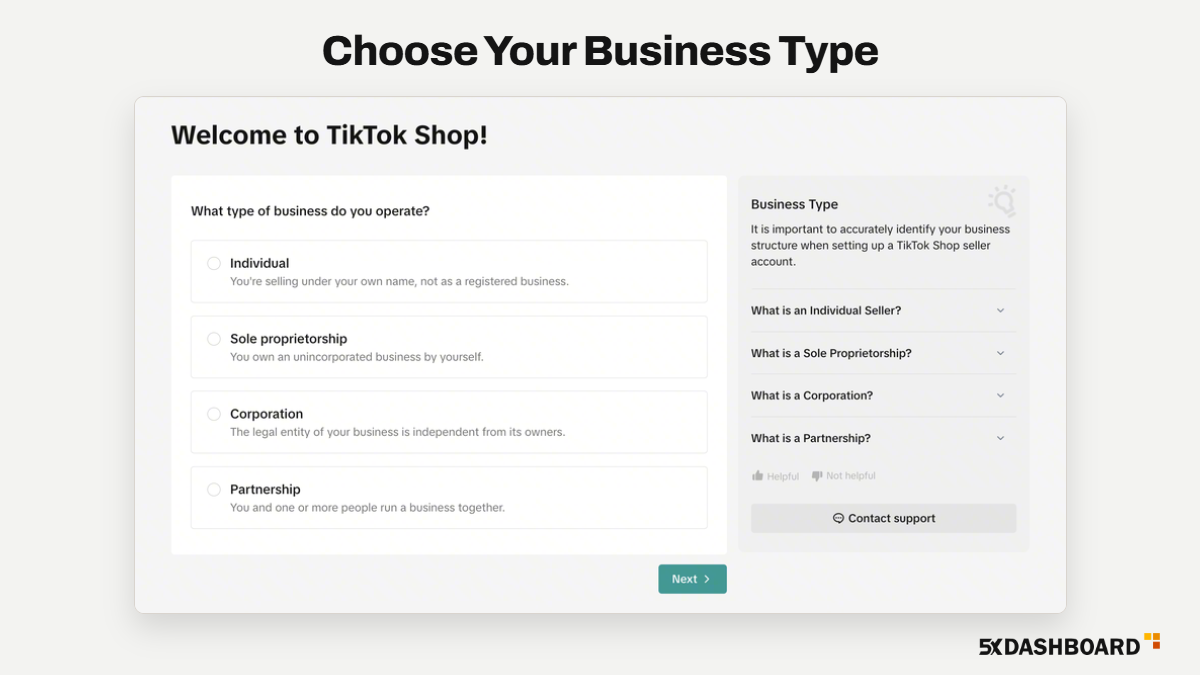
TikTok offers three seller types in the US. Pick the one that matches how your business is legally set up. The registration guidelines of TikTok say business and personal information can’t be changed after you submit.
Individual Seller
Choose Individual if you sell under your own name without a registered business. Sole proprietors without an EIN also register as Individual Sellers. TikTok verifies you with your ID, the last 4 digits of your SSN or ITIN, and proof of address.
Sole Proprietorship
Choose Sole Proprietorship if you own an unincorporated business by yourself and have an EIN. You add your legal business name, EIN, and registered business address, then your own details as the primary representative.
Corporation Or Partnership
Choose this type if your business is a legal entity separate from its owners (a corporation) or you run it with one or more people (a partnership). You add:
- Legal business name, EIN, and registered US business address
- The primary representative’s name, date of birth, residential address, and last 4 digits of SSN or ITIN
- Each ultimate beneficial owner’s (UBOs) name, date of birth, residential address, nationality, and ID
- Your parent company’s name and location, if you have one
Which Type To Choose
- No EIN: Individual Seller
- One owner, unincorporated, with an EIN: Sole Proprietorship
- Corporation or partnership: Corporation or Partnership
- LLC: TikTok guidelines for the US don’t list LLC as a separate type. They accept LLC tax forms as proof of business and define a corporation as a business that exists separately from its owners, which describes an LLC. Confirm your type with TikTok seller support before you submit, because you can’t change it afterward.
Documents And Information You Need For TikTok Shop
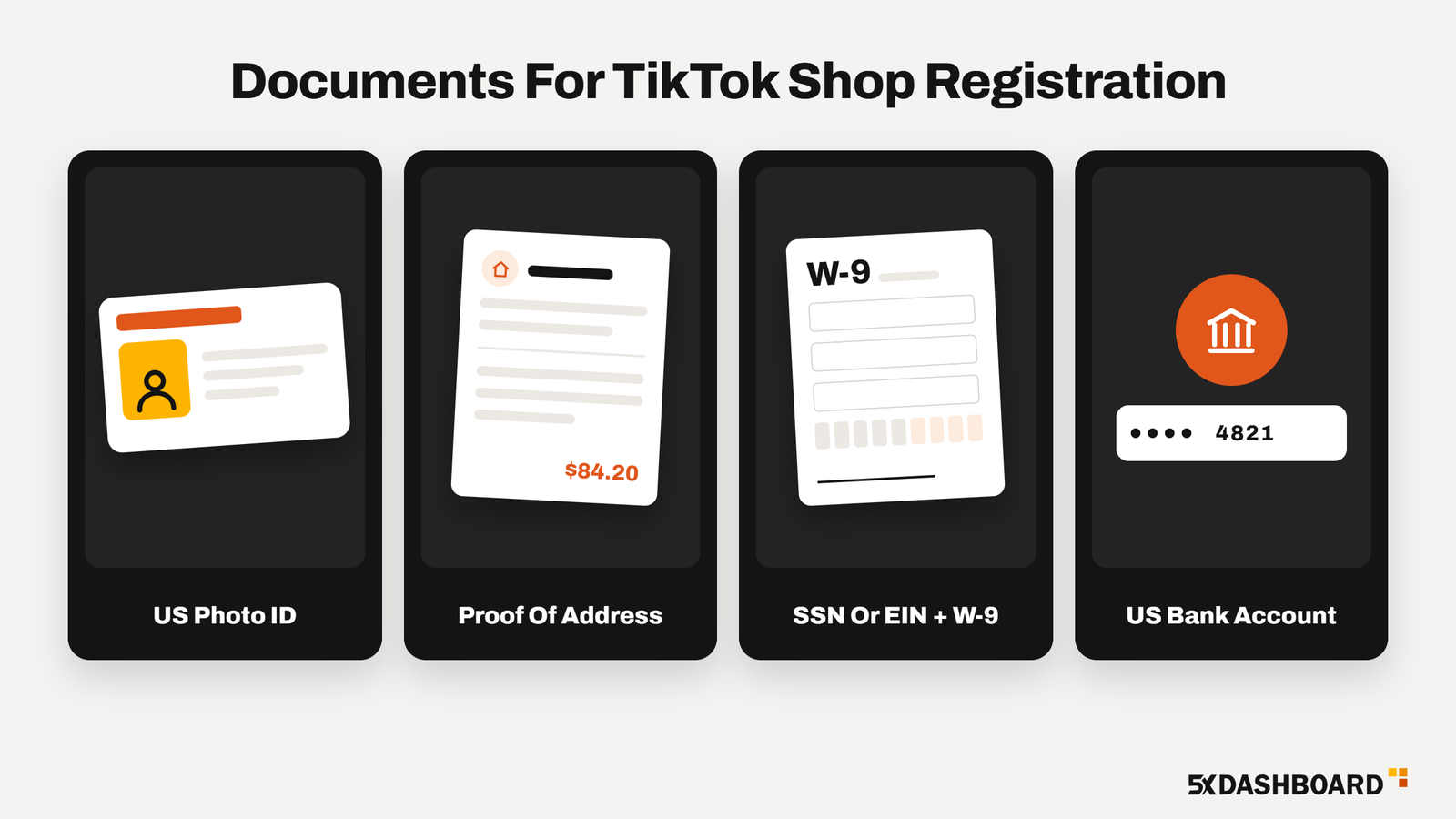
Gather these before you start your TikTok Shop seller registration. Every name, date, and address you type must match your documents exactly.
Identity Documents
TikTok accepts a US passport or passport card, US driver’s license, state ID, or Permanent Resident Card.
- Passport: Upload the photo page showing your name, date and place of birth, and expiration date.
- Passport card, driver’s license, state ID, or Permanent Resident Card: Upload the front and back.
- Expiration date: You type it into the form. If your state ID has no expiration date, enter 00-00-0000.
Proof Of Address
Upload one of these. It must show the same address you enter as your residential address.
- Utility bill (gas, water, electricity, or phone)
- Insurance policy
- Bank statement
- Credit card bill
Tax Information
- Individuals: The last 4 digits of your SSN, or your ITIN if you don’t have an SSN. The SSN must belong to the primary representative.
- Businesses: Your EIN, plus the last 4 digits of the primary representative’s SSN or ITIN.
- All US sellers: A completed Form W-9. The taxpayer name and number must match your other documents.
If TikTok asks for proof of business, upload the tax form that matches your entity:
| Business Type | Tax Form |
|---|---|
| Sole proprietorship | Form W-9 |
| General, limited, or limited liability partnership | Form 1065 |
| C corporation | Form 1120 |
| S corporation | Form 1120-S |
| Single-member LLC | Form 1040 |
| Multi-member LLC | Form 1065 or Form 8832 |
Bank Account Details
Have your account name, bank name, and account number ready. The account name must match your registered name as an individual, or your company name as a business.
Upload Rules
- PDF, JPG, or PNG, under 10 MB
- The full document in frame, shot straight on
- Valid and unexpired
- Unaltered
How To Register For TikTok Shop
You apply for TikTok Shop through one flow in Seller Center. These steps follow TikTok’s current US guides.
Step 1: Create Your Seller Account
- Open the TikTok Shop sign-up page.
- Enter your phone number or email (TikTok prefers a business email), or continue with your TikTok account, TikTok for Business, Google, or Apple.
- If you used a phone number or email, enter the verification code TikTok sends. Then set a password of 6 to 20 characters that mixes letters, numbers, and special characters.
- If you used your TikTok account, scan the QR code or log in, then select Authorize.
- Choose the United States as your region. You can’t switch regions later without a new application.
- Accept the terms. Enter an invitation code only if you have one.
Step 2: Choose Your Business Type
Select Individual, Sole Proprietorship, or Corporation or Partnership, using the rules above.
Step 3: Verify Your Identity And Business
Enter these details:
- Everyone: legal name, date of birth, residential address, ID expiration date, and last 4 digits of SSN or ITIN
- Businesses: legal business name, EIN, registered business address, and UBO details
Then upload your ID and proof of address.
US regulations require every seller’s business address to appear on product pages. If you enter your home address, tick Certify, and TikTok shows only part of it.
Step 4: Add Your Shop Name And Addresses
Your shop name is public. TikTok’s rules:
- Use letters, numbers, and special characters, but not only numbers or special characters.
- Don’t use “flagship” or “official.”
- Avoid names that make no sense.
- You can change the name later.
Then:
- Pick a primary product category. TikTok uses it only for registration, and it doesn’t limit what you sell later.
- Add a contact person and phone number.
- Enter your warehouse or pickup address and a return address. You can reuse the warehouse address for returns.
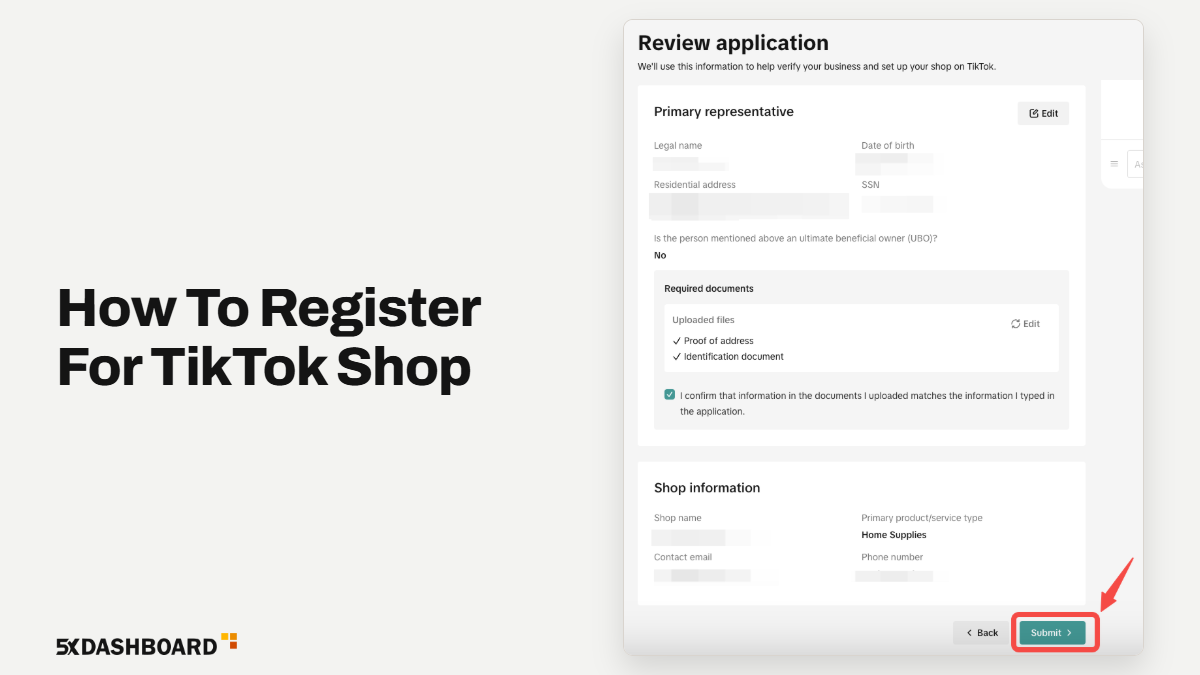
Step 5: Review And Submit Your Application
The Review Application page marks each detail:
- Green checkmark: verified and ready
- Yellow caution symbol: needs a fix or a supporting document
You can submit only when four fields verify: legal name, date of birth, residential address, and SSN. When the Information verified banner appears, select Submit.
Step 6: Add Your Tax And Bank Details
After TikTok verifies your documents, finish two tasks from the Seller Center home page:
- Tax form: complete the W-9.
- Bank account: select Link Bank Account, then Link Account, enter your account details, and select Submit.
Common Sign-Up Errors
- “Account already exists”: your phone number or email is already registered to a TikTok Shop or TikTok for Business account, such as Ads Manager. Select Change phone number or Change email address, or select Log in if the account is yours.
- Forgot password: select Log in with SMS code to get a text code, or Forgot the password? to reset it by text or email.
- Organization Account rejected: sign up with your email or phone number instead.
How Long TikTok Shop Approval Takes
TikTok doesn’t publish an approval time. Your application stays pending until review ends. If it fails, TikTok emails you with steps to resubmit.
In the US setups we run, TikTok reviews documents within several business days. Each time TikTok asks for more information, review pauses until you reply.
You can upload products while you wait. They stay hidden until verification is complete.
Why TikTok Shop Applications Get Rejected
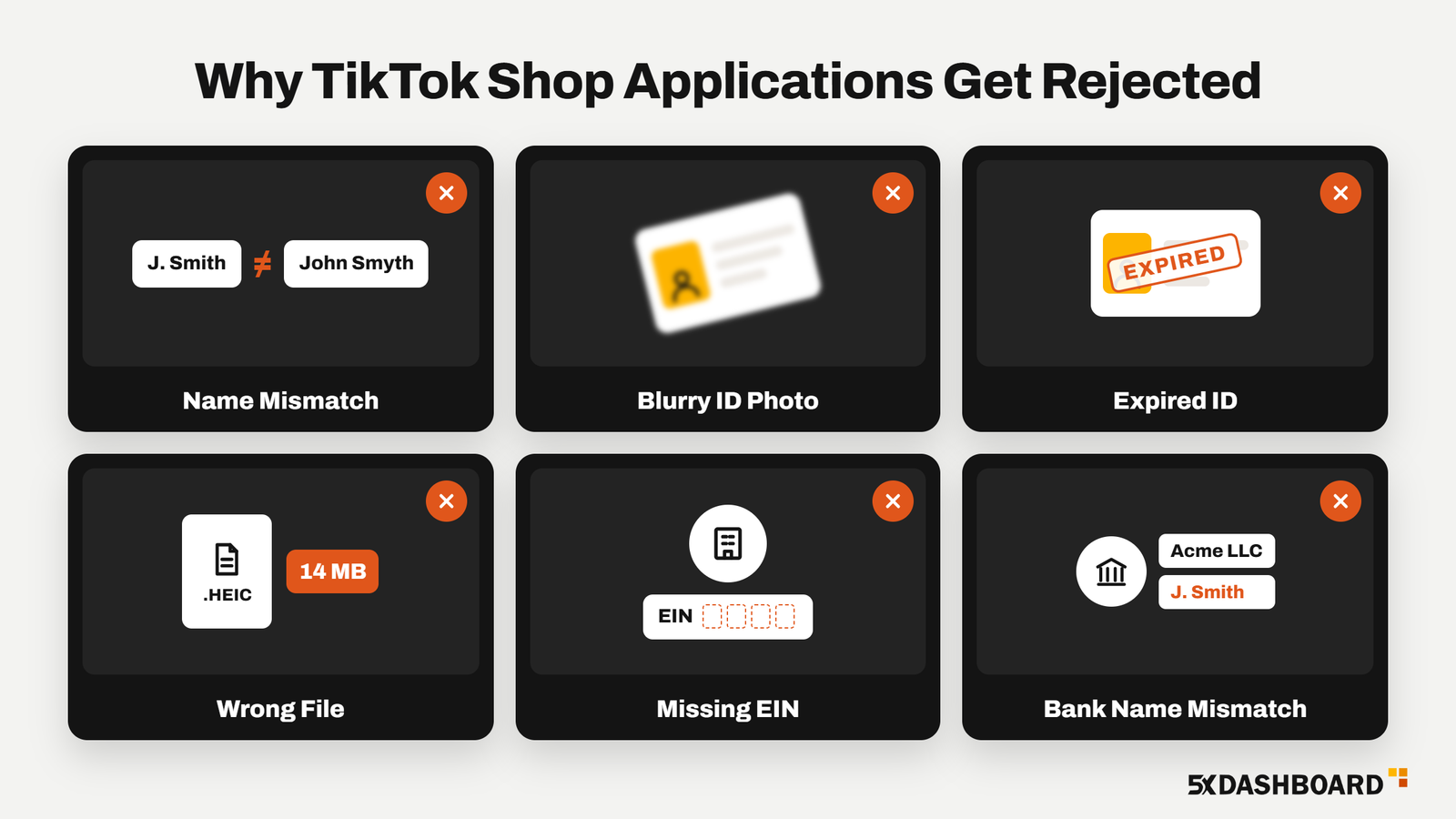
Common Rejection Reasons
- A name, date of birth, or address in the form that doesn’t match your ID or proof of address
- An ID photo that is angled, cropped, or unclear
- An expired or altered document
- A file over 10 MB, or in a format other than PDF, JPG, or PNG
- An SSN that doesn’t belong to the primary representative
- A missing EIN or business document for a business seller type
- A bank account name that doesn’t match your registered or company name
In our setups, a name mismatch between documents is one of the most common stalls. Before you submit, check that your name reads the same on your ID, proof of address, W-9, and bank account.
How To Fix And Resubmit
- Read the email from TikTok Shop; it explains what to resubmit.
- Open the Review Application page and find each yellow caution symbol.
- Select Edit in the top right to fix typed details, or upload documents to replace a file.
- Tick the box confirming your documents match the form.
- Select Submit.
Next Steps After TikTok Shop Approval
Set Up Your Shop
Setting up your shop means uploading products, setting up shipping, and linking your official TikTok account. Each shop links to one official TikTok account, and you can change it up to three times. Our guide on how to set up a TikTok Shop walks through each task.
Start Selling
Buyers check out inside TikTok from short videos, LIVE streams, and creator posts. Our guide on how to sell on TikTok Shop covers each channel.
Get Help With TikTok Shop Registration
5x Dashboard is a TikTok Shop agency for US shop sellers. Our TikTok Shop setup service handles registration for you: we prepare and pre-check every document, file it in Seller Center, and answer requests from TikTok Shop the same day.
Your shop is approved and live within 30 days, or we keep working at no extra fee. Once you’re live, we connect your shop to our network of 2,300+ creators. COCOL started with no TikTok Shop presence and reached $4.1M in GMV over 12 months using our TikTok marketing services.
You can get similar results. Book a free 15-minute call or call us today at +1 (972) 671-4522 to get started.
TikTok Shop Registration FAQs
Is TikTok Shop registration free?
Yes. TikTok charges no setup fee. Once you sell, TikTok takes a 6% commission on each sale.
Do you need an invitation code to register?
No. Enter one only if you’ve received one. TikTok uses the code to link your application to your business.
Can you change your details after you submit?
No. TikTok says business and personal information can’t be changed after submission. Your shop name is the exception, and you can change it later.
Do you need a website to register for TikTok Shop?
No. None of TikTok’s US requirements ask for a website. You can upload products one at a time, in bulk, or by syncing an online store you already run.
Can you register if you are not a US citizen?
TikTok’s US requirements don’t mention citizenship. Individuals must live in the US and can verify with a Permanent Resident Card. For businesses, the business address must be in the US, and each owner and representative needs a US passport, driver’s license, state ID, or Permanent Resident Card.
Muhammad Ali co-founded 5x Dashboard, a certified TikTok Shop Partner (TSP) agency, and founded Kixmon, a profit and loss analytics tool for TikTok Shop sellers. He entered ecommerce in 2020 and co-founded the Amazon agency E-Commerce Villa, where he managed PPC and account growth for private-label brands and hosted a podcast featuring operators like Brian R. Johnson, who generated $2.2B in Amazon revenue. He moved fully into TikTok Shop in March 2024. Ali is a Helium 10 Certified Professional with a background in ACCA accounting that underpins his profit-first approach to ecommerce growth.