

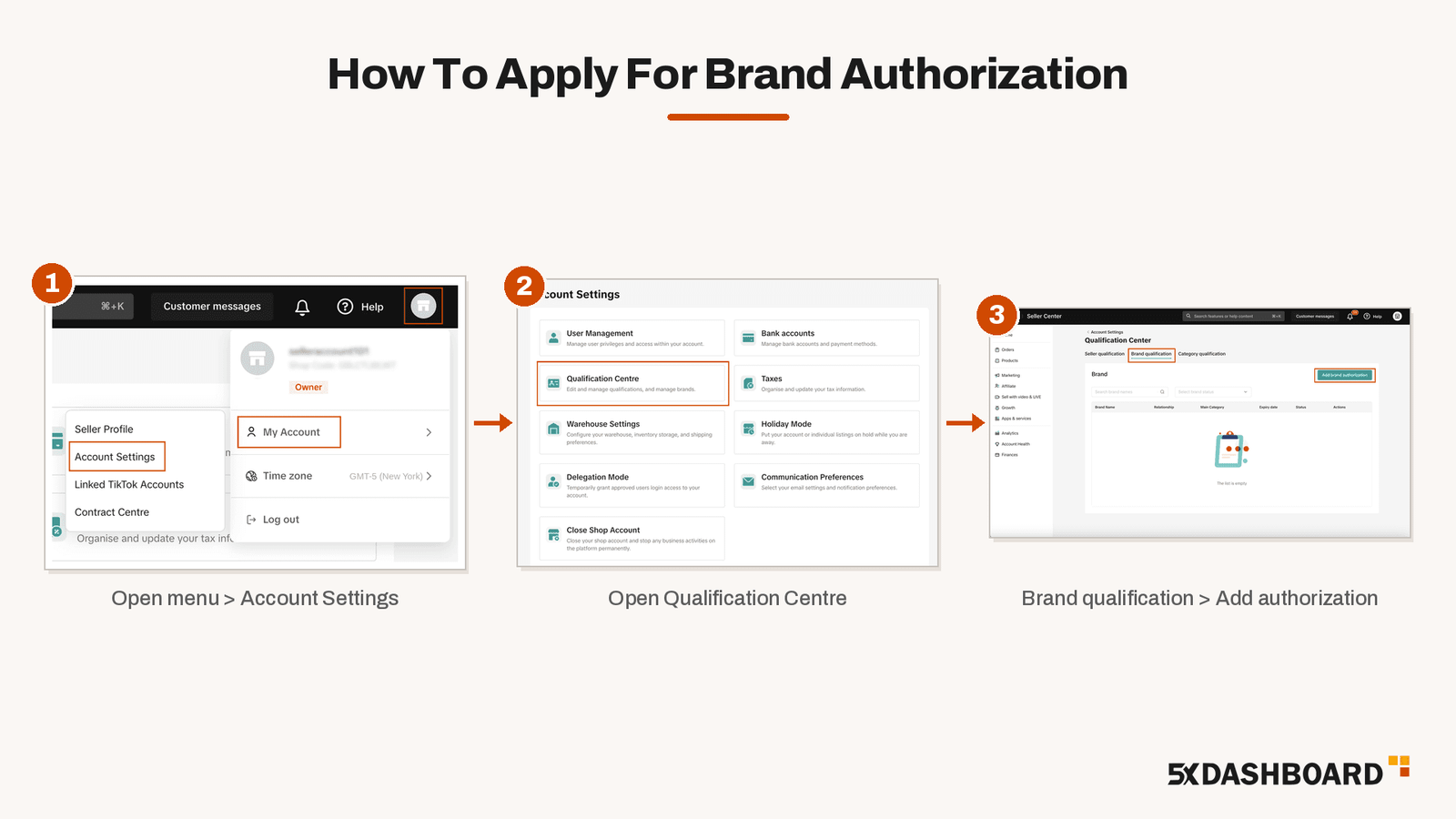
Brand authorization is approval from TikTok Shop to sell products that carry a registered trademark, name, or logo. You need it before you list any products. To apply, go to Seller Center > My Account > Account Settings > Qualification Center > Brand Qualification and click Add Brand Authorization.
Trademark owners can verify with their USPTO registration number. Resellers have to upload a Letter of Authorization from the brand, and licensees need to upload a license agreement.
5x Dashboard is a certified TikTok Shop Partner that sets up US brands on TikTok Shop. This guide covers the full process to help you get your brand authorization approved on TikTok Shop.
When You Need Brand Authorization On TikTok Shop
TikTok requires brand authorization to list any trademarked product. When you add a product, you pick its brand from a dropdown list:
- Brands you can select right away: Some brands need no approval.
- Greyed-out brands: These brands need approval. They stay greyed out until TikTok approves your authorization.
Do not select “No brand” for a product that is clearly branded. TikTok prohibits this. If you sell branded products without authorization, TikTok can remove your products and restrict your selling rights or your account.
TikTok Shop Brand Authorization Types
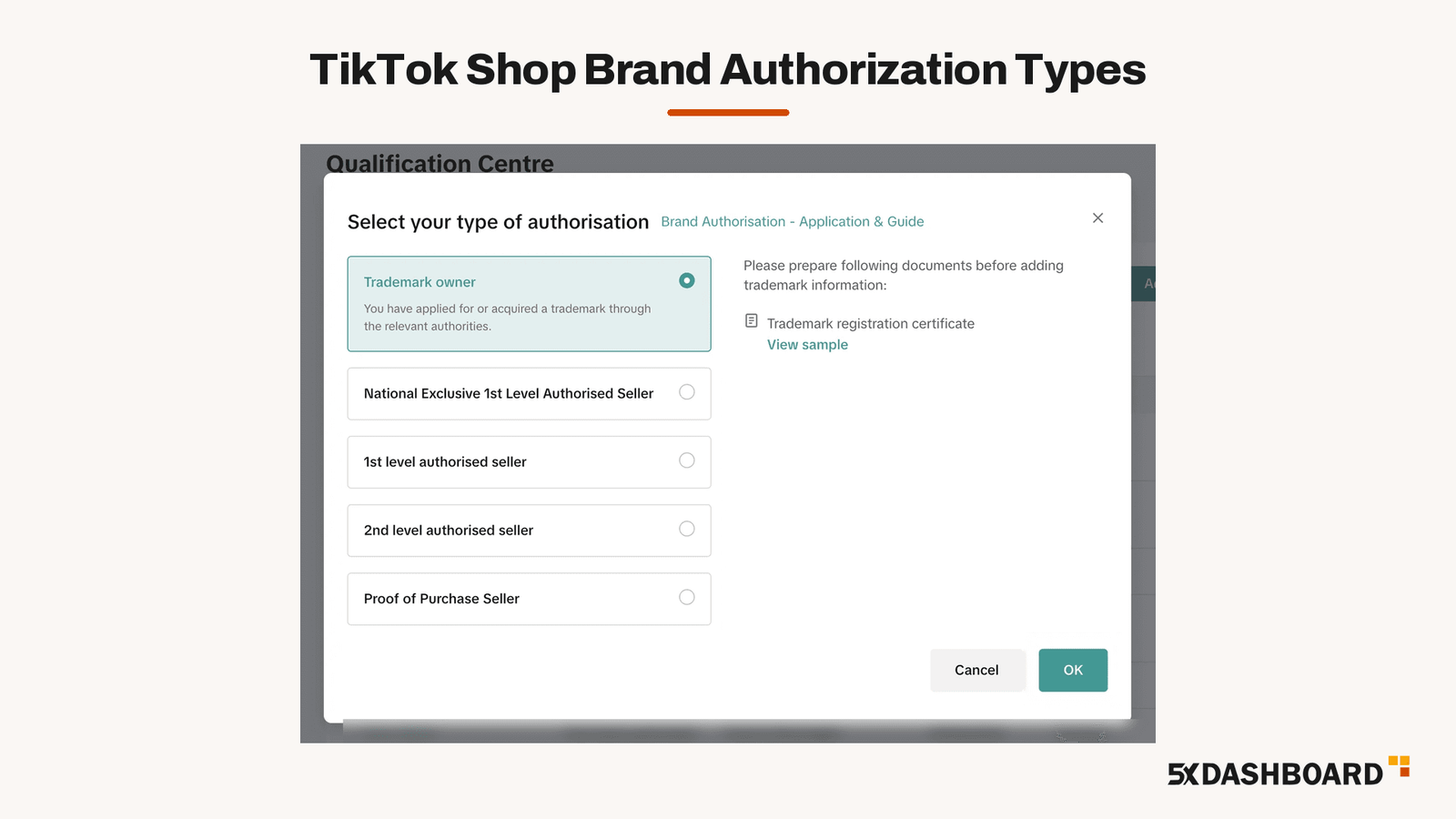
Pick the type that matches your relationship to the brand:
| Authorization Type | Who It Is For | What You Submit |
|---|---|---|
| Trademark Owner | You own the registered US trademark | Your USPTO trademark registration number |
| First Level Authorized Seller | The trademark owner gave you permission to sell | A Letter of Authorization from the trademark owner |
| Second Level Authorized Seller | A distributor or reseller that the brand authorized gave you permission to sell | A letter from the seller who authorized you. TikTok recommends adding the brand owner’s letter to that seller. |
| Proof of Purchase | You bought the products from a legitimate distributor | Valid proof of purchase from that distributor |
| Co-Branding and Licensing | Your products show your brand together with another brand, or a brand owner licensed you to use its trademark | A signed license agreement |
How To Apply For Brand Authorization
- Log in to TikTok Shop Seller Center and click your shop name in the top right corner.
- Go to My Account > Account Settings.
- Open Qualification Center, then Brand Qualification.
- Click Add brand authorization.
- Choose your authorization type.
- Submit your proof. Trademark owners enter the registration number, click Verify, then click OK. Resellers and licensees upload their documents.
- Wait for TikTok to review your application. TikTok reviews applications within about three business days.
Check the brand name before you submit, because TikTok does not allow brand name changes after approval. You can have up to two pending requests for the same brand at a time.
TikTok Shop Trademark Owner Verification
Your trademark must be registered with the United States Patent and Trademark Office (USPTO):
- Use the registration number: TikTok only accepts the trademark registration number in this field.
- Apply after registration: TikTok asks sellers not to submit trademarks that still show “Pending” status at the USPTO.
- Check the email on your USPTO record: TikTok verifies your number against USPTO records and sends a verification code to the email address on file for that trademark. You have 10 days to enter the code. You can see which email is on file in the USPTO’s TSDR database.
If verification fails, check the number and submit again.
TikTok Shop Letter Of Authorization Requirements
Resellers and distributors prove their right to sell with a Letter of Authorization (LOA). TikTok requires the letter to include:
- The name and contact email of the party granting authorization
- The name of the party receiving authorization (your business)
- The brand name
- The United States as the country where you will sell
- The product category you will sell
- An expiry date for the authorization
If the authorization has no end date, select the Permanent checkbox when you apply. The letter must also:
- Be on the brand owner’s official letterhead
- Carry the signature or official stamp of the person authorized to sign
- Show your business name exactly as it appears in your Seller Center account
- Be clear and easy to read
- Be a PDF, PNG, JPG, or JPEG file of 5 MB or less (TikTok prefers PDF)
TikTok Shop Co-Branding And Licensing Agreement Requirements
Apply for co-branding and licensing authorization if your products show your own brand together with another brand, or if a brand owner licensed you to use its trademark. Go to Add brand authorization > Co-Branding and Licensing and upload your license agreement.
TikTok rejects incomplete agreements. Your agreement must name:
- Licensor: The brand that lets you use its trademark
- Licensee: Your brand
- Licensor IP: The trademark you are licensed to use
- Product Category: This must match the trademark class on the licensor’s trademark certificate
- Expiry Date: Select Permanent if the license has no end date
Use the words “licensor,” “licensee,” and “license” in the agreement so TikTok can identify it as a license agreement. If the license expires, you lose authorization, and TikTok may take down your products.
TikTok Shop Brand Name Rules
Your brand name must match your registered trademark, official website, product packaging, and product labels. The match must be exact, including capitalization, punctuation, and spacing. TikTok also requires your brand name to have:
- 2 to 30 characters, in any language
- At least one letter or number
- No ®, ©, ™, or symbols
- No more than 5 digits in a row
- No links, domain names, or email addresses
- No sales phrases such as “Top Seller,” “free shipping,” “best deals,” or “50% off”
- No altered spellings, such as swapped characters (a zero in place of an O), repeated letters, misspellings, shortened names, or added spaces
How To Avoid A Brand Authorization Rejection
TikTok rejects incomplete co-branding agreements and can reject any document it finds insufficient or falsified. Check your application against these requirements before you submit:
| Problem | Fix |
|---|---|
| You entered a serial number or product number | Enter the USPTO trademark registration number |
| Your trademark is still pending at the USPTO | Wait until the USPTO registers the trademark, then apply |
| The verification code went unused | Enter the code within 10 days. Check which email is on your USPTO record. |
| Your business name on the letter doesn’t match your Seller Center account | Ask the brand owner to reissue the letter with your exact business name |
| The letter is missing a required detail | Ask for a new letter with the grantor’s name and email, your business name, the brand, the United States as the selling country, the product category, and an expiry date |
| The letter has no letterhead, signature, or stamp | Ask for the letter on the brand owner’s letterhead, signed or stamped |
| The file is blurry, too large, or the wrong format | Upload a clear PDF, PNG, JPG, or JPEG of 5 MB or less |
| Your brand name doesn’t match your trademark, website, packaging, or labels | Use the exact same brand name everywhere, including capitalization, punctuation, and spacing |
| Your co-branding agreement is incomplete | Add the licensor, licensee, licensor IP, product category, and expiry date |
| Your letter or trademark has expired | Renew the trademark with the USPTO or get a new letter from the brand owner |
After TikTok Approves Your Brand
- New listings: Your authorization applies to every product you list under that brand from now on.
- Existing listings: Edit each listing, add the brand, and republish it.
- Trademark renewal: If your trademark expires, you lose brand authorization and TikTok may take down your products. Renew your trademark with the USPTO before it expires.
- LOA renewal: Contact the brand owner at least 30 days before your letter expires to ask for a renewal.
How To Appeal A Brand Or IP Violation
If TikTok removes a listing for a brand or intellectual property violation, you can appeal it in Seller Center:
- Go to Account Health > Shop Health > Violation Records. You can also open the violation from your Message Center.
- Open the violation and read the enforcement action and the reason.
- Click Appeal.
- Choose your appeal reason.
- Upload your supporting documents and submit.
You get two appeals per case. File the first appeal within 30 days of the enforcement action. If TikTok rejects it, file the second appeal within 15 days of the rejection.
Upload the evidence that matches your appeal reason:
| Appeal Reason | What To Upload |
|---|---|
| I am the intellectual property rights owner | Your trademark, copyright, or design patent certificate, matching the violation details |
| I am authorized by the intellectual property rights owner | Your Letter of Authorization or license agreement |
| The product was purchased through a legitimate channel | Invoices or receipts for the product |
| Misjudgment by platform | Screenshots of your brand authorization approval, or proof that the flagged brand differs from your product |
Invoices and receipts must match the listed product and have no edits or redactions. They must also be dated within the last 12 months and before you listed the product. TikTok rejects appeals with missing documents, invalid documents, or the wrong document type.
How To Get An Official Shop Or Authorized Seller Badge
Brand authorization lets you list a brand’s products. The badge shoppers see needs its own application under Seller Center > Growth > Brand Recognition. TikTok offers two brand badges:
- Official Shop badge: For verified notable brand owners, exclusively authorized sellers, and official distributors. An Official Shop can only sell products from its certified brand.
- Authorized Seller badge: For distributors, agents, and eligible retailers authorized by a recognized brand, either directly by the brand (first level) or through one of its authorized sellers (second level). TikTok gives this badge to sellers offering well-known brands and to strategic sellers it recognizes.
To keep either badge, your shop needs a logo, at least five active in-stock listings, and no counterfeit or other serious violations. TikTok reviews badge applications by hand, which takes about one week. It also reviews badges once every 30 days, at the start of each month.
Badges appear in LIVEs, product pages, short videos, and search results. Official Shop badges display with a blue verification checkmark.
Set Up Your TikTok Shop With 5x Dashboard
5x Dashboard is a TikTok Shop Agency that handles TikTok Shop management and setup for US sellers. Our TikTok Shop setup services get your shop approved and selling in 30 days. After launch, we grow your sales with TikTok marketing services. Book your free consultation or call us today at +1 (972) 671-4522 to get started.
TikTok Shop Brand Authorization: FAQs
Do I need brand authorization for every product on TikTok Shop?
No. You need it for trademarked products from brands that show as greyed out in the brand list. You can select other brands without approval.
Can I apply for brand authorization with a pending trademark?
No, you can’t apply for brand authorization with a pending trademark. TikTok only accepts trademarks registered with the USPTO. Wait until your trademark is registered, then apply with the registration number.
How long does TikTok Shop brand authorization take?
TikTok reviews a brand authorization application within about three business days. Official Shop and Authorized Seller badge applications take about one week.
Do I need brand authorization for co-branded products?
Yes. If your product shows your brand together with another brand, apply under Co-Branding and Licensing and upload a complete license agreement.
Can I change my brand name after approval?
No, you can’t change your brand name after approval. TikTok does not allow brand name changes after approval, so check the spelling before you submit.
How many times can I appeal a TikTok Shop violation?
You can appeal twice per case. File the first appeal within 30 days of the enforcement action and the second within 15 days of the first rejection.
What happens when my trademark or authorization letter expires?
If your trademark expires, TikTok removes your brand authorization and may take down your products. For a Letter of Authorization, ask the brand owner for a renewal at least 30 days before it expires.
Muhammad Ali co-founded 5x Dashboard, a certified TikTok Shop Partner (TSP) agency, and founded Kixmon, a profit and loss analytics tool for TikTok Shop sellers. He entered ecommerce in 2020 and co-founded the Amazon agency E-Commerce Villa, where he managed PPC and account growth for private-label brands and hosted a podcast featuring operators like Brian R. Johnson, who generated $2.2B in Amazon revenue. He moved fully into TikTok Shop in March 2024. Ali is a Helium 10 Certified Professional with a background in ACCA accounting that underpins his profit-first approach to ecommerce growth.